


.png)
Introduction
According to BrightEdge, AI Overviews now appear in approximately 48% of tracked Google queries, up significantly from last year.
You followed the AEO playbook. You improved content, strengthened trust signals, and started seeing your brand appear in AI Overviews. Visibility increased, citations rolled in, and leads followed.
Then the citations disappeared.
No rankings crash. No major traffic drop. No obvious technical issue. Yet your content was suddenly missing from the AI answers where it had previously appeared.
If that sounds familiar, you're not alone. AI visibility is far more volatile than traditional rankings. A page cited today can disappear tomorrow, even when nothing changes on your site.
This blog explains why AI Overview visibility drops and the practical steps you can take to improve your chances of getting cited again.
Why Are You Losing AI Overview Visibility?
AI Overviews are appearing across a growing share of searches. If your blog was getting cited and then stopped, the reasons fall into two buckets.
Content Factors
1. Stale information
AI systems prefer content that feels current and trustworthy. If your page relies on outdated statistics, old examples, unsupported claims, or hasn’t evolved with the topic, it becomes easier for AI to replace it with more relevant sources.
2. Weak E-E-A-T signals
AI assesses whether your brand is trusted across sources. A real author byline, reviews on platforms like G2 or Capterra, Reddit discussions, third-party mentions, or in industry publications. If AI can only find information about you on your own domain, it has fewer trust signals to justify surfacing your content over competitors with stronger external validation.
3. Poor content structure
AI doesn't read a blog like a human. It scans for concise, well-structured answers that it can surface quickly. If readers have to go through multiple paragraphs before reaching the answer, AI may prioritise content that addresses the question immediately.
4. Weak Topical Association
AI needs to understand what topics your brand should be associated with. If your content is scattered, covers too many unrelated themes, or lacks depth in a core area, AI may struggle to connect your site to specific queries.
5. Missing YouTube + LinkedIn
YouTube content increasingly appears in AI-generated results, while LinkedIn is becoming more visible for professional and B2B topics. If your content only exists on your website, you’re limiting the places AI systems can discover and validate your expertise.
6. Technical and crawlability issues
Sometimes AI just can't access your site. Outdated robots.txt files, client-side rendering, aggressive firewall settings, or slow page speeds can all block AI crawlers without you realizing it.
Google and Platform Factors
1. Google's AI model changes
Google changed the model behind AI Overviews twice in 2026 without any announcement. Each switch reshuffled which sources get cited. One tracked brand went from 96% citation rate to 3.7% in a single week, with nothing changing on their end.
2. Rankings don't guarantee AI visibility
In mid-2025, 76% of AI Overview citations came from pages that also ranked in the top 10. By early 2026, that dropped to 38%. You can rank on page one and still not show up in the AI Overview for that same search.
3. Google killed FAQ and HowTo rich results.
If your site relied on the FAQ schema to earn rich results that fed into AI Overviews, that pipeline is gone. Google retired FAQ rich results in May 2026 and HowTo earlier. Your schema may still validate in Search Console and show no errors, but validation no longer means visibility.
4. AI answers are inherently unstable.
This one isn't a problem you can fix because it's how generative AI works. Ask the same question twice, and you'll likely see different sources cited each time. Only about 20% of brands persist across five consecutive runs of the same query. So the real question isn't whether your blog is driving traffic from AI Overviews. It's whether your brand is showing up in the answer in the first place.
You can’t control platform changes, but you can control how prepared your content is for them. Here’s how to improve your chances of earning visibility again.
Steps To Recover AI Overview Visibility
Gaining back AI Overview visibility is a gradual process. At RevvGrowth, we've been applying these steps across our own content and client projects.
Step 1: Find out if AI Overviews actually caused your drop
A traffic drop doesn't automatically mean AI Overviews are the problem. It could be a core update, a technical issue, a competitor gaining ground, or a seasonal dip. Each needs a different fix, and mixing them up wastes months. Here's how we run this diagnosis at RevvGrowth.
1.1 Check your data in Google Search Console
Start with Google Search Console. Go to Performance > Search Results. AI Overview clicks and impressions are currently bundled into the "Web" search type, so you can't isolate them directly. What you can do is look for a specific pattern.
Set the date range to the last 3 months compared to the same 3 months one year ago. Not the previous quarter, because seasonal variation will mislead you. Go to the Pages tab and sort by the biggest drops in clicks.
For each page showing a significant drop, look at four metrics together: impressions, clicks, CTR, and average position.
We ran this exact check on our blog 'top ABM agencies’. Impressions went up, position had improved, but CTR dropped year over year. We were ranking better and getting seen more, but fewer people were clicking. That's when we knew AI Overviews were the problem, not our rankings.
We noticed this on one blog first. Then we ran the same check and found multiple pages showing the same pattern. In your spreadsheet, filter for pages where all three conditions are true:
- Impressions went up
- Position improved
- CTR dropped
Every page matching all three is a suspect. This is your Bucket 1 candidate list.
1.2 Manually verify which pages are actually affected
This part can't be automated. The spreadsheet gives you suspects. But data alone doesn't confirm AI Overviews are the cause. You need to see what the SERP looks like for each of these pages.
Take each suspect page and search its main topic or keyword in incognito. Desktop and mobile, because AI Overviews behave differently on each.
For every search, check:
Is there an AI Overview? Is it expanded (answer fully visible, fills the viewport) or collapsed? Expanded ones absorb far more clicks because users get the full answer without doing anything.
Is the answer complete? If the AI Overview fully answers the question, there's very little reason for anyone to scroll past it. If it gives a partial or surface-level answer, there's still a reason for users to click through. This tells you whether recovery for that page is realistic.
Who's being cited? A competitor? Reddit? YouTube? This tells you what kind of content Google's AI trusts for this topic right now.
Where does your result sit? On mobile, an expanded AI Overview can push organic results completely below the fold.
Screenshot each one, as you will need these later.
Do the same in ChatGPT and Perplexity. Search the same topics and check whether your content shows up at all.
1.3 Sort your pages into three buckets and save the baseline
Put each important page into one of three categories:
By the end of Step 1, you should have:
- A confirmed list of pages where AI Overviews are the cause.
- A baseline spreadsheet with current numbers.
Everything from Step 2 onward builds on this.
Step 2: Prioritize which queries to fight for
You know which pages are affected. Now zoom in. A single page can rank for dozens of queries, and not all of them are worth the same effort. Some trigger AI Overviews, others don't. Some drive revenue, others bring awareness, and traffic that never converts.
2.1 Pull the queries behind each Bucket 1 page
Click on each Bucket 1 page and look at the Queries tab. Export the full list.
For each query, add three columns to your spreadsheet:
Does this query trigger an AI Overview? Validate this manually in incognito or at scale using the Semrush AI toolkit. Note whether an AI Overview appears, whether your brand is cited, and which sources currently own visibility.
What's the intent? Informational (someone learning), commercial (someone evaluating), or transactional (someone ready to act)? This matters because informational queries trigger AI Overviews 36% of the time, far more than commercial (8%) or transactional (5%) queries. Commercial and transactional queries see AI Overviews less frequently, which means they're often more recoverable.
What's the business value? Does this query lead to conversions? Check your analytics. A query bringing traffic with zero leads is worth less recovery effort than one that drives demo requests.
2.2 Classify each query
Once you’ve identified the queries, classify them to decide where recovery effort is most likely to pay off.
Prioritise queries where recovery has a realistic chance of improving visibility and business impact.
2.3 Cluster recoverable queries by topic
Take your recoverable and worth-testing queries and group them by topic. Queries like "what is ABM," "ABM vs traditional marketing," and "best ABM tools" all belong to the same cluster, even if they land on different pages.
For each topic cluster, check:
- How much visibility opportunity exists across related queries?
- What sub-topics are competitors covering that you are not?
- What formats are being surfaced: listicles, comparison tables, videos, or guides?
- What is AI citing today that your content is missing?
The goal here isn’t to create more content. It’s to identify which topic areas deserve deeper investment and where you have the highest chance of recovering visibility. Once you identify a cluster, decide whether the next step is to update content, expand coverage, change format, or strengthen supporting assets.
For our client, Atlan, we took the topic "BCBS 239 Compliance" and broke it into the sub-topics people were actually searching for. We built detailed sections around each one. One of those sections later appeared in the AI Overview.
If you want help identifying similar opportunities for your site, you can schedule an AI visibility strategy call with RevvGrowth.
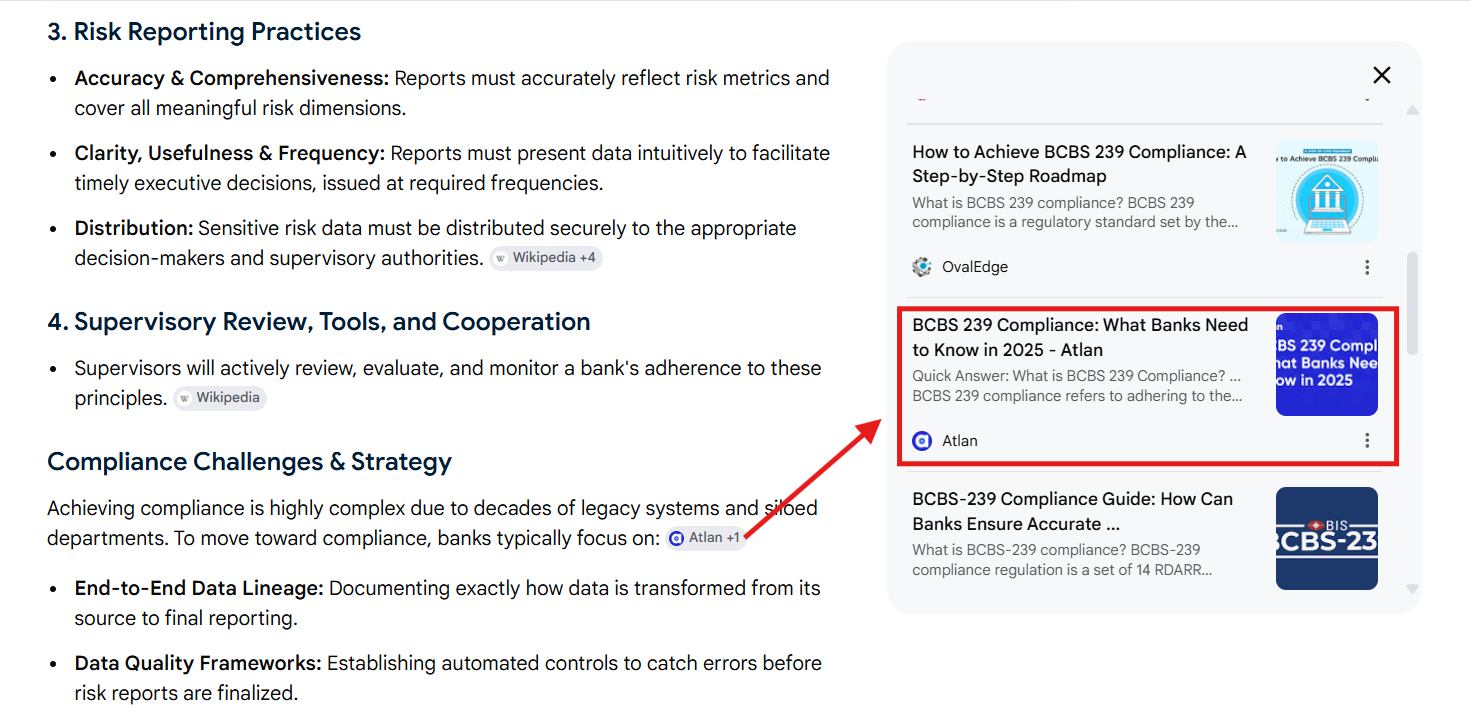
Screenshot: Atlan featuring in AI Overview
This becomes your roadmap for Step 3.
By the end of Step 2:
- A scored, classified list of queries grouped into topic clusters.
- You know which ones to fight for, which to test, and which to let go.
Turn your query list into an AEO action plan with RevvGrowth’s framework covering discovery, trust signals, content extraction, and AI visibility measurement.
Download: The B2B SaaS Guide to Getting Cited in ChatGPT, Perplexity & Google AI Overview
Step 3: Refresh and restructure your content
You know which queries matter and what AI is citing for them. Now you fix your pages.
3.1 Close the gaps
Go back to your action list from Step 2. For each cluster, you already noted what AI is citing and what gaps your content has. Now close them.
3.2 Restructure for extraction
Every section should lead with a direct answer to the question the heading raises. Your first 150-200 words should contain the clearest, most direct statement of what the page covers and what its core finding is.
- Headings: should match the way people actually search. If someone is searching for the difference between AEO and GEO, your heading should say exactly that.
- Comparison tables: AI engines extract structured data from tables far more reliably than prose. Digital Applied's study found that schema-marked pages with structured content are cited 2.3x more often in AI Overviews.
- Format matters: Evertune's analysis of 400 million citations across six AI platforms (including AI Overviews) found that 63% of citations point to listicle pages. 71-86% of those are numbered ranked lists.
3.3 Fix your schema
Schema is no longer just about rich results. While structured data helps search systems understand content and entities more clearly, recent studies suggest that schema alone does not meaningfully increase AI citations. Its value comes from supporting content clarity and trust, not acting as a citation shortcut.
What to implement:
- Article schema with author, datePublished, dateModified
- Add BreadcrumbList schema for a clear site structure.
3.4 Match the format AI is citing
Go back to your SERP screenshots. For each topic cluster, open the sources currently being cited. Study the format.
The goal: cover the same depth in the same format, then add something the current source doesn’t have. This is also where broader LLM search optimization techniques become useful, helping improve how content is interpreted and surfaced by AI systems.
Step 4: Fix the technical stuff AI crawlers need
Sometimes the problem has nothing to do with your content. AI literally can't read your site.
4.1 Check your robots.txt
Go to yourdomain.com/robots.txt. If you see User-agent: * with Disallow: /, every AI crawler is blocked. OtterlyAI's citation report found that 73% of sites have technical barriers that block AI crawlers' access.
You need to allow explicitly:
4.2 Make sure AI crawlers can actually see your content
Most AI crawlers can only read the raw HTML of your page. Rendering capabilities differ by platform. Google's own crawlers can handle JavaScript, so AI Overviews may still see your content. But if you want visibility across all AI platforms, your important content needs to be in the HTML that loads first, before any scripts run.
4.3 Check for invisible blocking
Some security tools block AI crawlers without telling you. Cloudflare's Bot Fight Mode is the most common culprit. It can silently intercept AI bots, and nothing will show up in your error logs or Search Console. If you use Cloudflare, check whether Bot Fight Mode is enabled and whether it's catching AI crawler traffic.
Also, check your server response times. Slow response times reduce crawl efficiency. If your pages take longer than that to respond, the crawler moves on, and your content never gets read.
By the end of Step 4:
- Your robots.txt allows the right crawlers.
- Your important content is readable without JavaScript.
- No security tools are silently blocking AI bots.
Step 5: Build trust signals that AI can verify
AI doesn't just read your page. It checks whether you're credible across the web. Getting into the citation list is the goal. But AI needs to trust you first.
5.1 Fix your author bylines
Add real author bylines to every priority page with their full name, role, credentials, and a link to their LinkedIn profile. It's a trust signal AI engines can verify when deciding whether to cite your content.
Here's how we do it at RevvGrowth. Every blog carries the author's name, a short bio with their background, and a direct link to their LinkedIn.
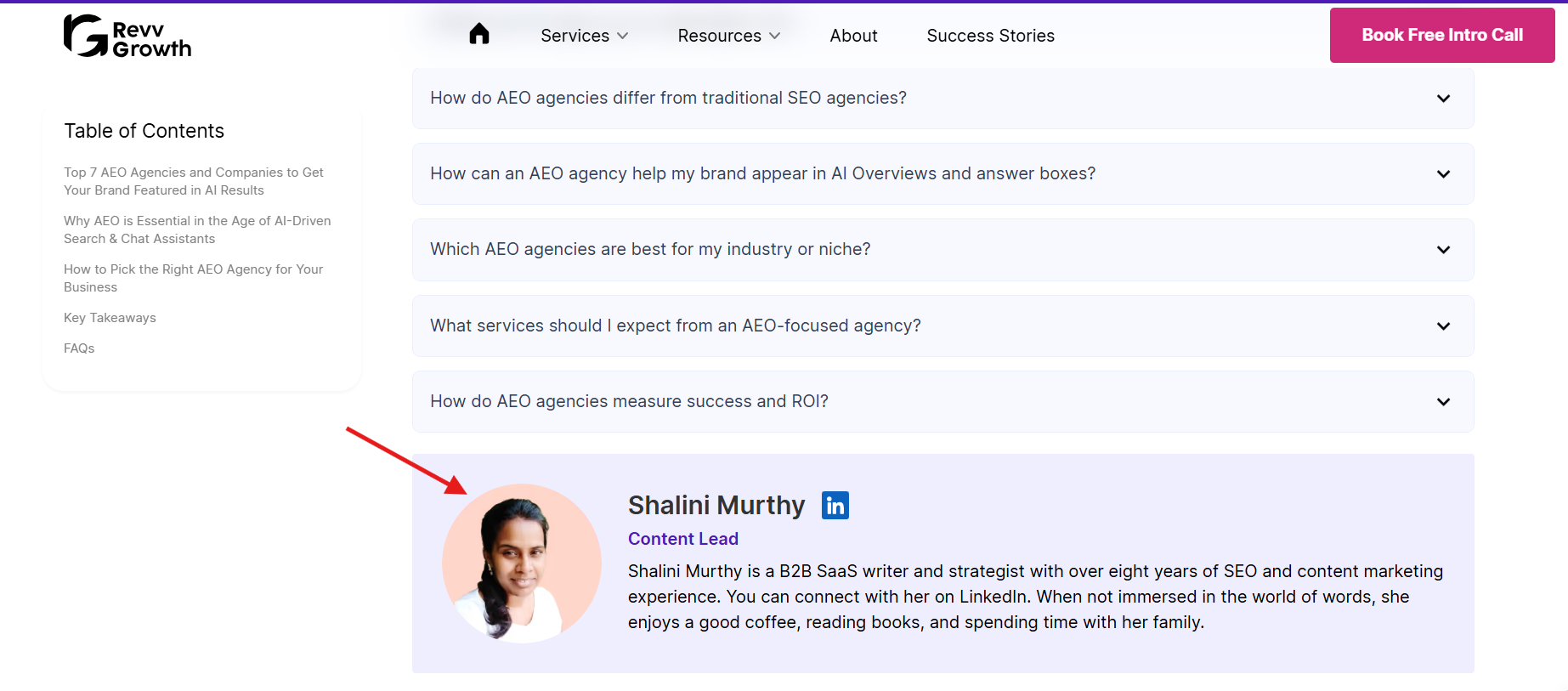
Screenshot: Author byline on a RevvGrowth blog showing name, credentials, and LinkedIn link.
5.2 Build off-site presence
If AI can only find you on your own domain, that's one source. When a competitor is discussed on Reddit, reviewed on G2, and mentioned in comparison articles, AI has multiple verification signals.
For example, RevvGrowth is listed in TripleDart's best GEO agencies, UnboundB2B's top ABM companies in the USA, and GrowthSpree's best ABM agencies for B2B SaaS. These are competitors in our space. When even your competitors are mentioning you, that's a stronger trust signal than any mention you could place yourself.
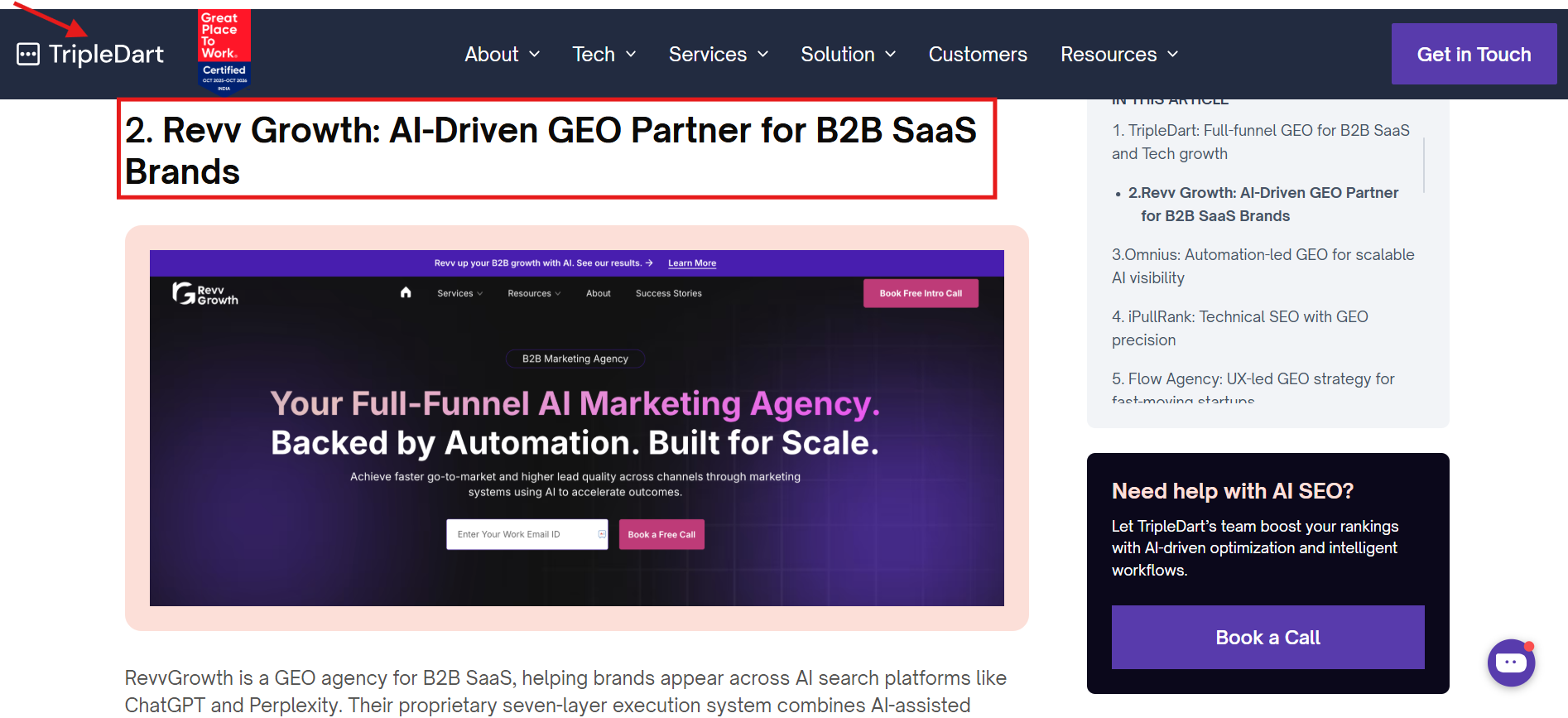
Screenshot: RevvGrowth featured in TripleDart’s blog
5.4 Build topical authority and internal linking
AI Overviews tend to favor sites that cover a topic in depth, not just a single page answering a single question. When your site has a cluster of connected content around a subject, with clear internal links between them, AI has more reason to treat you as a reliable source for that entire topic.
For our client MassMailer, we built a content cluster around Salesforce email deliverability, covering the topic from multiple angles. As a result, one of their blog articles appeared in the AI Overview results for the query “email relay.”
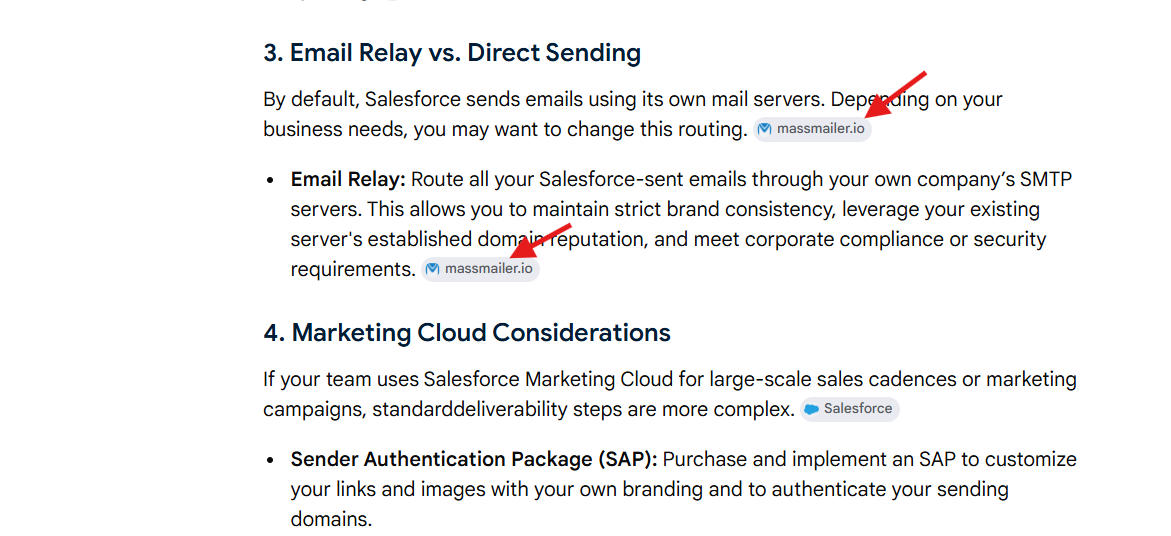
Screenshot: MassMailer blog appearing in AI Overview
The approach is straightforward. Pick a topic your audience is searching for, break it into sub-topics, build content around each one, and link them together so AI can see the full picture. A single blog post competing alone is easier to skip than a connected set of pages that covers the topic from every angle.
By the end of Step 5:
- Real author bylines on priority pages.
- Brand exists on review platforms.
- A plan to earn external mentions.
- Original data added to key content.
Step 6: Expand visibility across YouTube and LinkedIn Pulse
If your content only lives on your website, AI has one source to work with.
6.1 YouTube
OtterlyAI's study across six platforms found that Google AI Overviews alone account for 36.6% of all YouTube citation volume.
But the type of video that gets cited is very specific:
Views, likes, and subscriber count have almost no correlation with citation frequency. AI doesn't care about popularity. It cares about reference value and structure. Write detailed descriptions.
Look at your recoverable query clusters from Step 2. Which topics would benefit from a video? Start there.
6.2 LinkedIn Pulse
As buyers increasingly use AI platforms to research vendors and topics, LinkedIn is becoming an important source of professional and B2B discovery. LinkedIn highlights that AI systems increasingly reward content that demonstrates expertise, consistency, and identifiable authorship.
What works:
- Publish educational, experience-led articles, not promotional posts
- Turn your priority topic clusters into LinkedIn Articles
- Publish through subject matter experts with visible credentials
- Stay consistent around a few core topics to strengthen topical association
- Connect LinkedIn content back to your website and other owned channels
By the end of Step 6:
- A plan for long-form YouTube content on your most important topics.
- Key experts, publishing original content on LinkedIn.
Step 7: Set up ongoing monitoring
As the AI Overview ranking keeps changing, tracking and optimisation become a need of the hour.
7.1 Weekly: track your recoverable queries
Pick your recoverable queries from Step 2. Every week, search the queries in incognito mode on Google, ChatGPT, and Perplexity. Note who's being cited. Track whether you appear.
SparkToro's research found less than a 1-in-100 chance of the same brand list in two consecutive responses. Watch for sustained patterns, not week-to-week changes.
7.2 Monthly: check for outdated content
- Go through your priority pages. Check for gaps that have developed: outdated stats, competitors who added new sub-topics, and new tools missing from your comparison table.
- Re-check your robots.txt. CMS updates sometimes reset it without warning.
- Compare your Bucket 1 pages against the baseline you saved in Step 1. Are clicks and CTR recovering? Holding? Getting worse?
7.3 Quarterly: full audit
Run the full Step 1 diagnosis again. Check if new pages have developed the Bucket 1 pattern. Re-evaluate your Step 2 query classification. Queries you let go three months ago might now be recoverable if the AI Overview weakened.
Check competitor citations. Are new players showing up? What are they doing differently?
Evaluate what worked. If a restructured page starts getting cited, study exactly what AI is pulling from it. Replicate that across other pages. If a page still hasn't been cited after 90 days, it may need a different format or approach.
By the end of Step 7:
- A weekly tracking habit, monthly content check, and quarterly full audit.
- You know what to watch for and how to tell the difference between normal volatility and a real problem.
You now have the framework. If you want help prioritising opportunities and turning this into a repeatable AEO process, see how RevvGrowth helps B2B teams recover and grow AI visibility.
Key Takeaways
- If your impressions are going up and your rankings are improving, but fewer people are clicking, that's AI Overviews absorbing your traffic. If everything is dropping together, the problem is something else.
- Don't try to recover every query. Some are worth fighting for, others aren't. Focus on the ones that actually drive business results and where the AI Overview answer has gaps you can fill.
- AI pulls most of its citations from the top of your page. If your answer is buried halfway through the post, AI will cite someone who gets to the point faster.
- Pages with Article and BreadcrumbList schema get cited 2.3x more often in AI Overviews. Schema doesn't earn rich results anymore, but it helps AI understand and trust your page.
- Check your robots.txt. If AI crawlers are blocked, nothing else you do matters. The same goes for sites that depend on JavaScript to load content. Most AI crawlers can't read it.
- AI checks whether you're credible beyond your own website. Real author bylines, mentions on third-party sites, and original data in your content all help.
- YouTube is the single biggest source AI Overviews cites from. LinkedIn Pulse is the top source for professional queries. Both reward long-form, educational content, not short posts or viral clips.
- Google changed the AI model behind AI Overviews twice in 2026 without telling anyone. If you're not tracking your visibility regularly, you won't know when it shifts.
.svg)


.webp)
.avif)